
Samsung i8730 unlock successfull
Selected model: I9305
Selected port: COM125 SAMSUNG Mobile USB Serial Port
Selected port speed: 115200
Reading phone info...
Build: M8930B-BAAATAZM-3.2.22006
Reading security... OK
Searching server... OK
NET lock: #7465625*638*17090471#
Sub lock: #7465625*782*00000000#
SP lock: #7465625*77*00000000#
CP lock: #7465625*27*00000000#
For check lock status: *#7465625#
Done with Samsung Tool v.14.4
Selected port: COM125 SAMSUNG Mobile USB Serial Port
Selected port speed: 115200
Reading phone info...
Build: M8930B-BAAATAZM-3.2.22006
Reading security... OK
Searching server... OK
NET lock: #7465625*638*17090471#
Sub lock: #7465625*782*00000000#
SP lock: #7465625*77*00000000#
CP lock: #7465625*27*00000000#
For check lock status: *#7465625#
Done with Samsung Tool v.14.4
Samsung I9205 Smart Locked, Unlocked Done by Z3X!!!
Procedure:
1. Root phone CLICK ME
2. Type *#0808# and choose DM + Modem + ADB
3. Reboot phone
4. Select diagnostic port
5. Click Unlock
Screenshot:

1. Root phone CLICK ME
2. Type *#0808# and choose DM + Modem + ADB
3. Reboot phone
4. Select diagnostic port
5. Click Unlock
Screenshot:
samsung s5380k succesfully flash by z3x
samsung s5380k succesfully flash by z3x
here is link flash file S5380KDDLC4 - Download - 4shared - Chaurasiya Brothers

here is link flash file S5380KDDLC4 - Download - 4shared - Chaurasiya Brothers
Z3X-BOXM Samsung Update 16.3 - Bulk of Anycall's added
Samsung TooL Update 16.3 - Bulk of Anycall Added
Finally we have some anycall in hands, and now you have this update:
Anycall phones repair working over simple USB cable, just root phone and enable debug mode.
Now you can forget about playing with UART cable so update - FIRST IN THE WORLD AND EXCLUSIVE for z3x box customers.
More and more hot update on the way.
- support SHV-E210S (Safe direct unlock, imei repair, flashing) - FIRST IN THE WORLD
- support SHV-E210L (Sage direct unlock, imei repair, flashing) - FIRST IN THE WORLD
- support SHV-E250S (Safe direct codereading, unlock, imei repair, flashing) - FIRST IN THE WORLD
- support SHV-E250L (Safe direct codereading, unlock, imei repair, flashing) - FIRST IN THE WORLD
- support SHW-M250K (Safe direct unlock, imei repair, flashing) - FIRST IN THE WORLD
- support SHW-M250S (Safe direct unlock, imei repair, flashing) - FIRST IN THE WORLD
- support SGH-M919N (Direct codereading, unlock, imei repair, flashing)
- support SGH-M919V (Direct codereading, unlock, imei repair, flashing)
- support GT-i9100 (New imei repair algo)
- support GT-i9100P (New imei repair algo)
- support GT-i9100T (New imei repair algo)
Anycall repair working over simple USB cable, just root phone and enable debug mode.
Fixed:
- I9300 imei repair error
- N7100 imei repair error
P.S. Now we know who copy-paster :-)
Discuss here
Finally we have some anycall in hands, and now you have this update:
Anycall phones repair working over simple USB cable, just root phone and enable debug mode.
Now you can forget about playing with UART cable so update - FIRST IN THE WORLD AND EXCLUSIVE for z3x box customers.
More and more hot update on the way.
- support SHV-E210S (Safe direct unlock, imei repair, flashing) - FIRST IN THE WORLD
- support SHV-E210L (Sage direct unlock, imei repair, flashing) - FIRST IN THE WORLD
- support SHV-E250S (Safe direct codereading, unlock, imei repair, flashing) - FIRST IN THE WORLD
- support SHV-E250L (Safe direct codereading, unlock, imei repair, flashing) - FIRST IN THE WORLD
- support SHW-M250K (Safe direct unlock, imei repair, flashing) - FIRST IN THE WORLD
- support SHW-M250S (Safe direct unlock, imei repair, flashing) - FIRST IN THE WORLD
- support SGH-M919N (Direct codereading, unlock, imei repair, flashing)
- support SGH-M919V (Direct codereading, unlock, imei repair, flashing)
- support GT-i9100 (New imei repair algo)
- support GT-i9100P (New imei repair algo)
- support GT-i9100T (New imei repair algo)
Anycall repair working over simple USB cable, just root phone and enable debug mode.
Fixed:
- I9300 imei repair error
- N7100 imei repair error
P.S. Now we know who copy-paster :-)
Discuss here
Samsung TooL Update 16.3 - Bulk of Anycall Added First in the world
Samsung TooL Update 16.3 - Bulk of Anycall Added
Finally we have some anycall in hands, and now you have this update:
Anycall phones repair working over simple USB cable, just root phone and enable debug mode.
Now you can forget about playing with UART cable so update - FIRST IN THE WORLD AND EXCLUSIVE for z3x box customers.
More and more hot update on the way.
- support SHV-E210S (Safe direct unlock, imei repair, flashing) - FIRST IN THE WORLD
- support SHV-E210L (Sage direct unlock, imei repair, flashing) - FIRST IN THE WORLD
- support SHV-E250S (Safe direct codereading, unlock, imei repair, flashing) - FIRST IN THE WORLD
- support SHV-E250L (Safe direct codereading, unlock, imei repair, flashing) - FIRST IN THE WORLD
- support SHW-M250K (Safe direct unlock, imei repair, flashing) - FIRST IN THE WORLD
- support SHW-M250S (Safe direct unlock, imei repair, flashing) - FIRST IN THE WORLD
- support SGH-M919N (Direct codereading, unlock, imei repair, flashing)
- support SGH-M919V (Direct codereading, unlock, imei repair, flashing)
- support GT-i9100 (New imei repair algo)
- support GT-i9100P (New imei repair algo)
- support GT-i9100T (New imei repair algo)
Anycall repair working over simple USB cable, just root phone and enable debug mode.
Fixed:
- I9300 imei repair error
- N7100 imei repair error
P.S. Now we know who copy-paster
Hotfile link here
Finally we have some anycall in hands, and now you have this update:
Anycall phones repair working over simple USB cable, just root phone and enable debug mode.
Now you can forget about playing with UART cable so update - FIRST IN THE WORLD AND EXCLUSIVE for z3x box customers.
More and more hot update on the way.
- support SHV-E210S (Safe direct unlock, imei repair, flashing) - FIRST IN THE WORLD
- support SHV-E210L (Sage direct unlock, imei repair, flashing) - FIRST IN THE WORLD
- support SHV-E250S (Safe direct codereading, unlock, imei repair, flashing) - FIRST IN THE WORLD
- support SHV-E250L (Safe direct codereading, unlock, imei repair, flashing) - FIRST IN THE WORLD
- support SHW-M250K (Safe direct unlock, imei repair, flashing) - FIRST IN THE WORLD
- support SHW-M250S (Safe direct unlock, imei repair, flashing) - FIRST IN THE WORLD
- support SGH-M919N (Direct codereading, unlock, imei repair, flashing)
- support SGH-M919V (Direct codereading, unlock, imei repair, flashing)
- support GT-i9100 (New imei repair algo)
- support GT-i9100P (New imei repair algo)
- support GT-i9100T (New imei repair algo)
Anycall repair working over simple USB cable, just root phone and enable debug mode.
Fixed:
- I9300 imei repair error
- N7100 imei repair error
P.S. Now we know who copy-paster
Hotfile link here


ATF 610,505,510 Unlock v10.40 Update!! Public Disscussion Thread
Release Date: November 27, 2013 Firmware Version Required : 10.3.80
[ATF JTAG]
* Unlock Lumia WP7 Phones via Reading PIN and PUK Codes
Supported Models: Lumia 610 : RM-835 Lumia 610 : RM-849 Lumia 610C : RM-835 Lumia 510 : RM-889 Lumia 510 : RM-898 Lumia 505 : RM-923
* Boot Repair WP7 Phones
Supported Models: Lumia 610 : RM-835 Lumia 610 : RM-849 Lumia 610C : RM-835 Lumia 510 : RM-889 Lumia 510 : RM-898 Lumia 505 : RM-923
* Factory Boot Repair Cherry Mobile Phones
Supported Models: Skyfire 2.0 Flame 2.0 Flare (S100) - Updated with Corrected JTAG Pinouts Download AFP Files Here: http://www.4shared.com/folder/RLAWF5-j/CHERRY_MOBILE.html
* New ATF JTAG Exe version 1.04 ATF JTAG is Now Automatically Activated if ATF Box has 39 ATF JTAG Credits
[WP7 eMMC TP]
* Added 610 Qualcomm OSBL write via eMMC TP * Added 610C Qualcomm OSBL write via eMMC TP
[WP7 eMMC Direct]
* Added PERMANENT UNLOCK for WP7 Phones Unlocked via PIN or PUK Codes (Disable RE-Locking) Supported Models: Lumia 800 - Qualcomm OSBL must be written to phone first (via USB Flashing) Lumia 800C - Qualcomm OSBL must be written to phone first (via USB Flashing) Lumia 710 - Qualcomm OSBL must be written to phone first (via USB Flashing) Lumia 610 - Qualcomm OSBL must be written to phone first (via JTAG or eMMC TP) Lumia 610C - Qualcomm OSBL must be written to phone first (via JTAG or eMMC TP) Lumia 510 - Qualcomm OSBL must be written to phone first (via JTAG or eMMC TP) Lumia 505 - Qualcomm OSBL must be written to phone first (via JTAG or eMMC TP) * Added Restore DLOAD to Lumia 610 * Added Restore DLOAD to Lumia 610C
[General Updates]
* Complete Product Listing in Nokia.ini as of November 27, 2013) * Complete WP7/WP8 Variant Listing as of November 27, 2013
[Bug Fixes]
* Removed eMMC Communication Debug Messages * Removed WP7 Communication Debug Messages
Who will buy this if you can get more in ATF?

[ATF JTAG]
* Unlock Lumia WP7 Phones via Reading PIN and PUK Codes
Supported Models: Lumia 610 : RM-835 Lumia 610 : RM-849 Lumia 610C : RM-835 Lumia 510 : RM-889 Lumia 510 : RM-898 Lumia 505 : RM-923
* Boot Repair WP7 Phones
Supported Models: Lumia 610 : RM-835 Lumia 610 : RM-849 Lumia 610C : RM-835 Lumia 510 : RM-889 Lumia 510 : RM-898 Lumia 505 : RM-923
* Factory Boot Repair Cherry Mobile Phones
Supported Models: Skyfire 2.0 Flame 2.0 Flare (S100) - Updated with Corrected JTAG Pinouts Download AFP Files Here: http://www.4shared.com/folder/RLAWF5-j/CHERRY_MOBILE.html
* New ATF JTAG Exe version 1.04 ATF JTAG is Now Automatically Activated if ATF Box has 39 ATF JTAG Credits
[WP7 eMMC TP]
* Added 610 Qualcomm OSBL write via eMMC TP * Added 610C Qualcomm OSBL write via eMMC TP
[WP7 eMMC Direct]
* Added PERMANENT UNLOCK for WP7 Phones Unlocked via PIN or PUK Codes (Disable RE-Locking) Supported Models: Lumia 800 - Qualcomm OSBL must be written to phone first (via USB Flashing) Lumia 800C - Qualcomm OSBL must be written to phone first (via USB Flashing) Lumia 710 - Qualcomm OSBL must be written to phone first (via USB Flashing) Lumia 610 - Qualcomm OSBL must be written to phone first (via JTAG or eMMC TP) Lumia 610C - Qualcomm OSBL must be written to phone first (via JTAG or eMMC TP) Lumia 510 - Qualcomm OSBL must be written to phone first (via JTAG or eMMC TP) Lumia 505 - Qualcomm OSBL must be written to phone first (via JTAG or eMMC TP) * Added Restore DLOAD to Lumia 610 * Added Restore DLOAD to Lumia 610C
[General Updates]
* Complete Product Listing in Nokia.ini as of November 27, 2013) * Complete WP7/WP8 Variant Listing as of November 27, 2013
[Bug Fixes]
* Removed eMMC Communication Debug Messages * Removed WP7 Communication Debug Messages
Who will buy this if you can get more in ATF?
All Spd Android 100% safe remove pattern lock done no need adb or flash
download tool and all mobile 2mb
file, flash with this tool 2mb flash file your mobile 100% safe pattern
lock remove and hang on logo also solve but this file use without
format phone
not work on any box format hang on logo phone
doesn't matter phone version, use any version phone
100000000000000% safe tool
not work on any box format hang on logo phone
doesn't matter phone version, use any version phone
100000000000000% safe tool
link here
file
work on micromax a27,qmobile a2 light,lephone c05
not change any logo,after flash this 2mb file mobile
micromax%20a27
lava 349
lava349
agtel p100
agtel%20p100
zen u304
zen%20u304%20by%20gaba%20mobile
lava iris 401
lava%20iris%20401e
intax cloud x1
intax%20cloud%20x1%20gaba%20mobile
micromax a40
micromax%20a40
lava 349+
349+
opel as 45
https://www.mediafire.com/download/j...l%2520as45.rar
micromax a35 and q mobile a2 light
micromax%20a35
agtel p200
agtel%20p200
ktouch a15
https://www.mediafire.com/download/4...ch%2520a15.rar
karbonn a50
karbonn%20a50
karbonn a51
https://www.mediafire.com/download/h...nn%2520a51.rar
karbonn a3+
http://http://www.mediafire.com/down...%2520a3%2B.rar
byond b51
byond%20b51
byond%20b51
sansui sa41
sansui%20sa41
sansui%20sa41
HTC Desire 300 User Guide Manual Free download now
Download HTC Desire 300 User Guide Manual Free
All Advanced affordable, HTC Desire 300 offers the latest features of smartphones to monitor without breaking your budget. Vibrating screen with the home screen always refreshing, HTC Music Channel, and the speed of fast navigation.

Stay minute. Automatically update the home screen is updated every time you turn it on. Read the latest blogs, social networking messages , sports scores , news and much more . Whenever you look.
Audio captivating. Clear vocals and deep bass for music that comes alive .
Impressive display . Detailed images , bright colors , and videos in full rolling and beautiful photos.
HTC Home screen continuously transmits the BlinkFeed ™ custom content to your phone. With the most sought after applications and sources of popular content , you’ll stay in the loop with your social network, favorite blogs , news, sports scores and more. Select the Home screen BlinkFeed you want , and stay a minute glance.
You feel like you’re sitting in the studio for final assembly . And with HTC Music Channel , you can see the lyrics in sync with your music audio sensory experience of a – of a kind * .
* Database support based on the contents of the actual songs .
4.3 Functions of the entire display bearing ” saturated colors , rich visual effects and detailed graphics for a smartphone experience that will improve your web browsing and video playback.
Superb picture quality , web browsing and fast connectivity bulbs ™ powered by a Qualcomm Snapdragon ® processor with powerful dual-core processor with your mobile every son chain experience.
All Advanced affordable, HTC Desire 300 offers the latest features of smartphones to monitor without breaking your budget. Vibrating screen with the home screen always refreshing, HTC Music Channel, and the speed of fast navigation.
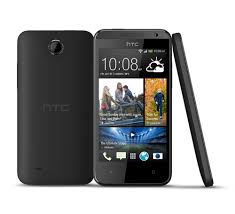
Stay minute. Automatically update the home screen is updated every time you turn it on. Read the latest blogs, social networking messages , sports scores , news and much more . Whenever you look.
Audio captivating. Clear vocals and deep bass for music that comes alive .
Impressive display . Detailed images , bright colors , and videos in full rolling and beautiful photos.
HTC Home screen continuously transmits the BlinkFeed ™ custom content to your phone. With the most sought after applications and sources of popular content , you’ll stay in the loop with your social network, favorite blogs , news, sports scores and more. Select the Home screen BlinkFeed you want , and stay a minute glance.
You feel like you’re sitting in the studio for final assembly . And with HTC Music Channel , you can see the lyrics in sync with your music audio sensory experience of a – of a kind * .
* Database support based on the contents of the actual songs .
4.3 Functions of the entire display bearing ” saturated colors , rich visual effects and detailed graphics for a smartphone experience that will improve your web browsing and video playback.
Superb picture quality , web browsing and fast connectivity bulbs ™ powered by a Qualcomm Snapdragon ® processor with powerful dual-core processor with your mobile every son chain experience.

HTC Desire 300 user manual,HTC Desire 300 user guide manual,HTC
Desire 300 user manual pdf,HTC Desire 300 user manual guide,HTC Desire
300 owners manuals online,HTC Desire 300 user guides,
Qmobile A2 Lite Hang On LOGO Done With Write A2Lite Factory File(PAC Format) By Eagle
Qmobile A2 Lite Hang On LOGO Done With Write A2Lite Factory File(PAC Format) By Eagle-Eye

Gtouch tablet model twd-mid Hang Problem Solve By EAGLE-EYE
Gtouch tablet model:. twd_mid Hang Problem Solve By EAGLE-EYE
Code:
  Welcome to use miracle box(World's First Fuzzy Logic Based Tool)
  SoftWare Version 1.63  Update:13-11-01
  Firmware Version:1.10
  Connected OK.
  Connecting Internet...
  You use Latest Miracte Software 1.63
  Fuzzy Logic Method is very safe and reliable !
  Connecting to Phone,Wait..ok
  Hardware:sun5i
  Board:nuclear
  CPU ABI:armeabi-v7a
  Manufacturer:unknown
  Model:TWD_MID
  Android Ver:4.0.4
  bootloader ver:unknown
  USB config:mass_storage,adb
  User:root
  Baseband ver:
  Build number:nuclear_evb-eng 4.0.4 IMM76D 20130423 test-keys
  IMEI1:
  Root:  Rooted
  Done
  Connecting to Phone,Wait..ok
  Wipe data...
>>Done


Android Tablet tools 2014 About All Tablet Working Tools


Easy to use Touch screen fixer
lOOk your touch screen Ic then select
you must have firmware android version 4.1 and UP before it work
also include touch screen calibration and a10 a13 auto wipe
firmware download 4.2.2 in GUI
easy to use
Download
LAVA E-Tab Z7H Tablet Hang Problem Solve
Any software problem in LAVA E-Tab Z7H Tablet [SOLVED]
This method fully factory rest yur tab nd even fix the not booting problems:
1. SD Card (It will be formatted, Please backup your data)
2. SD Card Reader
3. Your PC
4. Your Tablet
5. Data Cable
Procedure
1. Download this two zip files.
Flash tool umedia tablet zip
LAVA Z7H S005 20120829 withoutcontent img
4shared Link LAVA Z7H S005 20120829 withoutcontent img
2. Extract the "Flash tool umedia tablet.zip".
3. Open the "PhoenixCard.exe".
4. Click on "Image File" & browse to where you have downloaded the image file "LAVA_Z7H_S005_20120829_withoutcontent.img".
5. Insert your sd card to the card reader & insert in the usb port of your PC.
6. Click on "Format to Normal", then click Burn.
7. After finished the above step completely remove the SD Card from card
reader & insert it in your tablet. Make sure the tablet is off.
Then power on it.
OR
Insert a small pin in the reset hole.
8. Now you can see a red progress bar moving. After it is completed the tablet will be switched off.
9. Now remove the SD Card and Turn on you tablet.
Micromax X285 MTK 6253 All 100% Done with GPG Dragon Box / Dongle
Micromax X285 MTK 6253 All 100% Done with GPG Dragon Box / Dongle
Read Info

Read File

Read Code

Read Code using File

Format

Write IMEI

Write File

Your Dragon Box, My Dragon Box, Our Dragon Box Read Info

Read File

Read Code

Read Code using File

Format

Write IMEI

Write File
 !!!
Infinity-Box CDMA-Tool v1.97 released
Infinity-Box CDMA-Tool v1.97 released
Alcatel-C131 version MTS.C131.B04 25-Jun-2013 supported

Official Link
Infinity-Box CDMA-Tool v1.97 released
Mirror Link
Infinity-Box CDMA-Tool v1.97
Alcatel-C131 version MTS.C131.B04 25-Jun-2013 supported
Official Link
Infinity-Box CDMA-Tool v1.97 released
Mirror Link
Infinity-Box CDMA-Tool v1.97
LGTOOL 2.24 released Optimus L3 unlock and more
LGTOOL
by SEtool team
Version 2.24 released!
New version highlights:
Highly improved Optimus L3 series support
Improved LG&HTC IMEI calc algo
DIRECT DOWNLOAD LGTOOL & SGTOOL
DOWNLOAD LGTOOL & SGTOOL FROM GOOGLE
New for LGTOOL direct services:
LG E400, E400B, E400F, E400G, E400GO, E400R
- Direct Unlock
- Repair IMEI
- Repair Bluetooth
New for LGTOOL remote services:
LG D802TR, D801Z
- calculate unlock codes
Other changes in LGtool, SGtool and remote services:
- HTC IMEI calc algo improved
- LG IMEI calc algo improved
You can view our official reseller list here. Resellers with credits available are marked as “In stock”, please contact them now to avoid disappointment.
Note:
Since v. 2.0 new license system for activated users is added. Please do not install LGtool 2.xx until you purchase LGtool license (paid activation).
by SEtool team
Version 2.24 released!
New version highlights:
Highly improved Optimus L3 series support
Improved LG&HTC IMEI calc algo
DIRECT DOWNLOAD LGTOOL & SGTOOL
DOWNLOAD LGTOOL & SGTOOL FROM GOOGLE
New for LGTOOL direct services:
LG E400, E400B, E400F, E400G, E400GO, E400R
- Direct Unlock
- Repair IMEI
- Repair Bluetooth
New for LGTOOL remote services:
LG D802TR, D801Z
- calculate unlock codes
Other changes in LGtool, SGtool and remote services:
- HTC IMEI calc algo improved
- LG IMEI calc algo improved
You can view our official reseller list here. Resellers with credits available are marked as “In stock”, please contact them now to avoid disappointment.
Note:
Since v. 2.0 new license system for activated users is added. Please do not install LGtool 2.xx until you purchase LGtool license (paid activation).
Install Jelly Bean 4.1.1 on Qmobile Noir A8 download now

Warning: Follow the guide at your own risk, We will not be held responsible if anything goes wrong by following the steps mentioned below
Installing Jelly Bean 4.1.1 on Qmobile A8 procedure:
- First of all make sure your phone is ROOTED. If it’s not, follow out guide on
- Now install ClockWorkMod Recovery from Google play or anyother external site on your Qmobile Noir A8.
- Download one of the following two ROMs:
IncPak’s Jelly Bean 4.1.1 ROM for Qmobile Noir A8 [Link 1] [Link 2]
WinGoku’s Jelly Bean 4.1.1 ROM for Qmobile Noir A8 [Link 1]
I recommend the Incpak's ROM as it is running on 2 of my phones...
WinGoku’s Jelly Bean 4.1.1 ROM for Qmobile Noir A8 [Link 1]
I recommend the Incpak's ROM as it is running on 2 of my phones...
- Now copy this download .zip file to your SD Card;
- Power Off your Noir A8;
- Boot your phone into Recovery mode: Hold down the POWER + VOLUME UP buttons, release the POWER button when you see the boot logo;
- Make a backup: select backup and restore, then backup. When it is done select Go Back;
- Now perform the following Wipes:
Select Wipe/Data Factory Cache;
Select Wipe Cache Partition;
Go to advanced and select wipe dalvik cache;
Go back to the main menu. - Now select Select Install zip from sdcard, then Choose zip from sdcard and then select the .zip file that you copied to your SD Card and select Yes;
Once the installtion is completed, your Qmobile will reboot into JellyBean 4.1.1.
Please leave you feedback on this guide.Thank you
Please leave you feedback on this guide.Thank you

Smart Phone Multiport Download SP_MDT_exe_v3.1320.00.00 Download Now
SmartPhone Multiport Download
Ver:3.1320.00

Download
Ver:3.1320.00
Download
Subscribe to:
Posts (Atom)
